How to Get Started with VWProjects
通过 Walt Packer | 更新: 03/03/2026 | 评论: 0
博客主题


Product Category


搜索博客
订阅博客
出现新文章时获得邮件。选择您感兴趣的主题。
推荐文章
您是否想了解一个主题更多?请让我们知道。
Managing vibrating wire sensors shouldn’t mean juggling spreadsheets, re-entering coefficients, or troubleshooting configuration errors in the field. VWProjects was built to simplify setup, reduce errors, and scale from small installations to major infrastructure projects.
In this article, we'll discuss installation, share practical tips for configuring your project files, and show you how a real-world deployment at Wolf Creek Dam put VWProjects to work at scale.
What is VWProjects?
VWProjects is project management software for the handheld VWAnalyzer Vibrating Wire Analyzer. The software enables you to define sensor parameters, organize sites, manage baselines, and prepare your field deployment before you ever step on-site.
How easy is it to set up VWProjects?
In just two steps, you’ll be ready to go.
Step 1: Install VWProjects.
Getting VWProjects onto your machine is quick. You have two options:
- Network install – If you're connected to your workstation, find the VWProjects executable directly on the VWAnalyzer storage space.
- Direct download – Download the software from our VWProjects page.
Once installed, open VWProjects and you're ready to start building your project file.
Pro Tip: If the application window seems cut off or misaligned, press Windows Key + Left Arrow to snap and resize it to fit your screen.
Step 2: Configure your project file.
With VWProjects open, the next step is setting up your project file. This is where you define your sensors, sites, and measurement parameters.
Inputting Baseline Readings, Gauge Factors, and Sensor Elevation
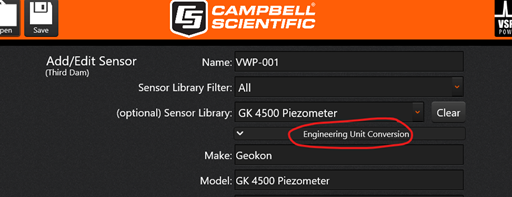
The project file interface gives you a dedicated area to input baseline readings, gauge factors, and sensor elevation where applicable. Setting this right from the start ensures your data are accurate and consistent throughout your monitoring project’s life. In the screenshot below, you can see where to add these.
Using the Sensor Library to Save Time
One of the most useful features in VWProjects is the built-in sensor library. When you select a sensor from the library:
- Thermistor or RTD coefficients are automatically populated.
- The frequency sweep is automatically adjusted to match the sensor type.
This eliminates manual data entry errors and speeds up your initial setup considerably.
Tracking Your Sensors with Serial Numbers
Make asset tracking and field verification easier by inputting serial numbers for each sensor directly into your project file. This is a simple step that pays off significantly when managing large sensor networks or troubleshooting in the field.
Knowing Your Capacity Limits
VWProjects and the VWAnalyzer support up to 880 unique sensors per project file. For multi-user teams, the platform supports 20 users with access to up to 40 sites with 22 sensors per site. Planning your project structure around these limits from the beginning will save frustration later.
Real-World Example: Wolf Creek Dam
Theory is useful, but seeing VWProjects in action on a real project tells the full story.
The U.S. Army Corps of Engineers uses VWAnalyzers at Wolf Creek Dam, monitoring a total of 193 vibrating wire sensors. The dam was divided into sites based on dam sections, with individual sensor names assigned to each station. The ability to have the stations managed in VWProjects helped reduce time with field measurements, and all the measurements were downloaded as a single CSV file per site from the VWAnalyzer.
For large-scale civil infrastructure monitoring such as this one, having an organized, pre-configured project file is convenient, but more importantly, it saves time and reduces errors.
Why should you use VWProjects and VWAnalyzer?
- Save time by using a computer to create site-wide or project-based project files.
- Amend project files when adding, replacing, or removing sensors.
- Add sensors in the field with manual entry.
- Read one-time sensors.
By combining the VWAnalyzer with VWProjects, field teams can work more efficiently, knowing that each site is reporting accurate data.
Are you ready to get started?
VWProjects is designed to make vibrating wire sensor monitoring more accurate, more organized, and faster to execute in the field. From a single sensor installation to a 193-sensor dam monitoring project, the workflow scales with your needs.
Download VWProjects from our site to start building your project file right away.
Do you need more information to help you get started? If you have any questions or comments, please reach out to our sales team or leave a comment below.
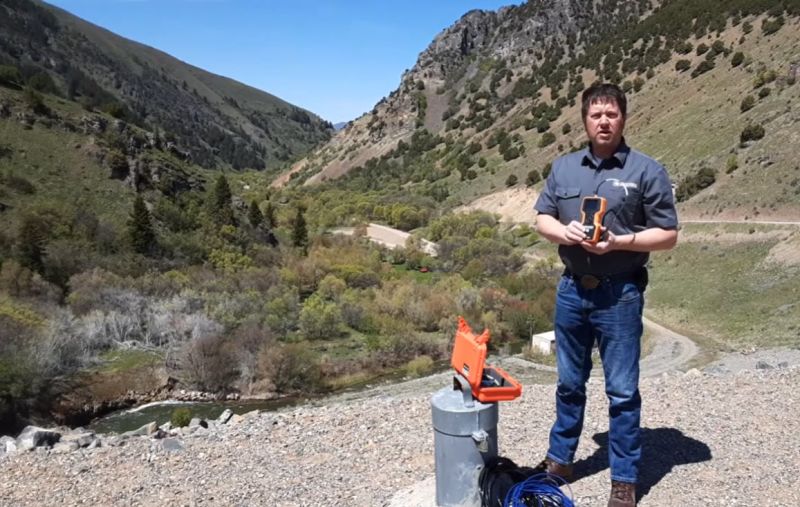
Note: Brent Randall of Campbell Scientific, Inc. is portrayed in the main image.


关于作者
 Walt Packer is a Sales Specialist in the Infrastructure Group at Campbell Scientific, Inc., covering the Western US. He has a degree in geology and worked for the USGS, as well as multiple mining companies. When Walt isn’t helping customers, he enjoys spending time outdoors with his family.
建议
Please log in or register to comment.